Menu

FuseBeads Hub © 2026

Video Game Fuse Bead Patterns: Mario, Pokemon & Minecraft Pixel Guides

Create pixel-perfect video game characters with fuse beads! Step-by-step guides for Mario, Pokemon, Minecraft, plus tips, materials, and FAQs.

Iniciante5 min read de leitura

Why Video Game Characters Are Perfect for Fuse Beads

Video game characters and fuse beads are a match made in pixel heaven. Classic games like Super Mario Bros., Pokémon, and Minecraft are built on grids of colorful squares—exactly the same way fuse beads work. Every sprite is essentially a pixel map, which means you can recreate your favorite heroes with stunning accuracy using just a pegboard and a handful of beads. Whether you grew up blowing into NES cartridges or you're discovering retro gaming through modern remakes, these patterns let you hold a piece of gaming history in your hand. The appeal goes beyond nostalgia. Fuse bead projects are a low-cost, screen-free way to engage with the games you love. They make fantastic gifts for gamer friends, eye-catching wall art for your game room, and even durable keychains for your backpack. Best of all, the pixel-perfect nature of video game sprites means there's no guesswork—if you can count squares, you can make these patterns. In this guide, we'll walk through three iconic franchises—Mario, Pokémon, and Minecraft—with practical tips for each. We'll also cover materials, ironing techniques, and how to design your own sprites when you're ready to level up.

Mario and Friends: Classic Platformer Patterns

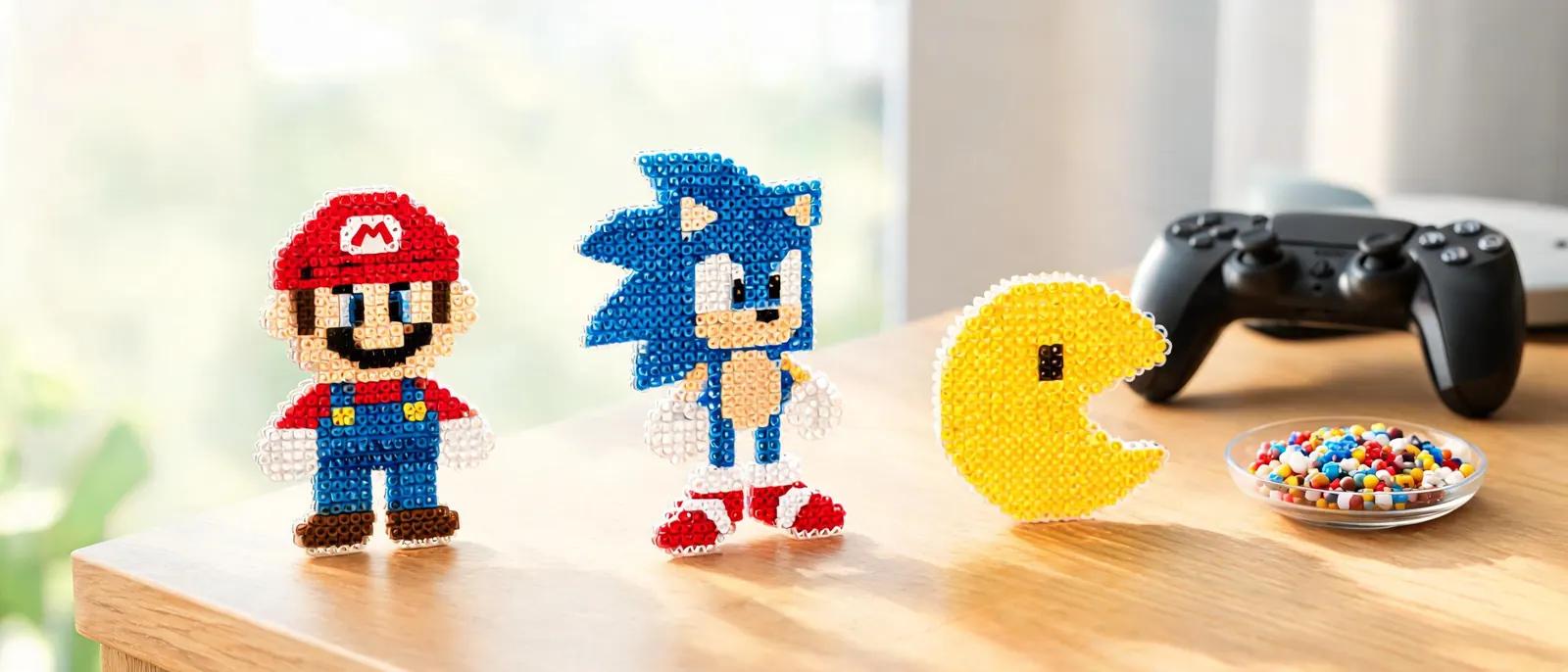
Mario is the gateway drug of fuse bead crafting. His 16-bit sprite from Super Mario World is a fan favorite because it's detailed enough to be recognizable but simple enough for beginners. For a standard Mario figure, you'll need a large square pegboard (29x29 pegs), red, blue, yellow, black, white, and skin-tone beads. Start by outlining the character's silhouette in black—this acts as a guide and prevents color bleeding. Then fill in the hat and shirt with red, overalls with blue, and buttons and shoes with yellow. The face requires careful placement of skin-tone beads, with black for eyes and mustache. Once you've mastered Mario, expand to Luigi, Princess Peach, Bowser, and even enemies like Goombas and Koopa Troopas. These make excellent coasters or magnets for a gaming-themed kitchen. For a more advanced challenge, try a multi-board project like a full Mario scene with pipes and blocks. You can connect multiple pegboards using interlocking tabs, then iron the sections separately and assemble them on a backing board. A common mistake with Mario patterns is using too many similar shades. Mario's red should be a true red, not orange-red. His blue overalls should be a medium blue, not navy. If you're unsure about color matching, check out our fuse bead color guide for brand-specific recommendations. Also, remember that ironing will slightly flatten and spread the beads, so leave a tiny bit of space between colors if you want crisp lines.
Mario and Friends: Classic Platformer Patterns

Pokémon: Gotta Bead 'Em All

Pokémon is arguably the most popular subject for fuse bead art, and for good reason: the original 151 Pokémon were designed as pixel sprites, so their shapes translate perfectly to beads. Start with Pikachu—his bright yellow body, black-tipped ears, and red cheeks are easy to render. You'll need a 29x29 pegboard, yellow, black, red, white, and brown beads. The key to a great Pikachu is getting the tail zigzag right and placing the eyes symmetrically. Once you've got Pikachu down, try Bulbasaur, Charmander, and Squirtle to complete the starter trio. For a more challenging project, tackle evolved forms like Charizard or Gengar, which require multiple pegboards. These larger sprites look incredible as wall art or ornaments for the holidays. If you're making a set of Pokémon, consistency is key—use the same brand of beads for all of them so the colors match. Also, consider using a 3D fuse bead technique to make Pokémon that stand up on their own, like a Poké Ball or a Snorlax. One tip for Pokémon patterns: pay attention to shading. Many sprites use two or three shades of the same color to create depth. For example, Pikachu's yellow might have a lighter yellow highlight and a darker yellow shadow. Don't skip these subtle details—they're what make the character pop. If you're short on specific colors, you can often substitute a similar shade, but be sure to test iron a small sample first to see how it looks.

Minecraft: Blocky Characters Made Easy

Minecraft is the perfect franchise for fuse bead beginners because its characters are literally made of blocks. Steve, Creeper, Enderman, and Zombie are all built from simple square grids, making them ideal for small pegboards. A Creeper face, for instance, only requires green, black, and a touch of lighter green for highlights—you can complete it in under 30 minutes. These make fantastic keychains or fidget toys for kids. For a more impressive project, try a 3D Minecraft block like a grass block or a diamond ore block. You'll need to create six square panels (one for each side) and then join them using the 3D fuse bead tutorial. This technique involves ironing each panel lightly, then stitching or gluing them together to form a cube. The result is a sturdy, display-worthy piece that looks great on a desk or shelf. You can also scale up to make larger blocks using multiple pegboards. Minecraft patterns are also great for teaching kids about symmetry and counting. Because the blocks are so regular, children can easily follow a grid pattern and see immediate results. If you're crafting with young ones, check out our guide to fuse beads safe for kids for important safety tips. And remember, Minecraft's color palette is limited, so you don't need a huge bead collection to get started—a basic set of 20 colors will cover most characters.
Minecraft: Blocky Characters Made Easy

Materials, Tools, and Ironing Like a Pro

Before you start any video game fuse bead pattern, gather the right supplies. You'll need a set of pegboards (large square and small square are most versatile), a bead organizer or sorting tray, tweezers for placing tiny beads, ironing paper, and an iron with adjustable temperature. For video game patterns, midi beads (5mm) are the standard because they offer the best balance of detail and ease of use. If you're working on a very detailed sprite, you might prefer mini beads (2.6mm), but they require more patience and a steady hand. Ironing is where most beginners struggle. The key is to use medium heat (no steam) and move the iron in slow, circular motions. Press down gently—don't scrub. You'll see the beads start to fuse together; stop when the holes are about half-closed for a classic look, or fully closed for a smoother finish. Always iron on a heat-safe surface, and let the project cool completely before removing it from the pegboard. If you're new to ironing, our how to iron fuse beads guide has detailed step-by-step photos. For larger projects that span multiple pegboards, iron each section separately, then assemble them using a low-temperature glue gun or by ironing the seams together. If you're making a set of characters, consider storing your finished pieces in a bead storage system to keep them organized. And if you're looking for the best tools, our recommended fuse bead tools list covers everything from ergonomic tweezers to heat-resistant mats.

Designing Your Own Patterns and Leveling Up

Once you've mastered existing patterns, you'll want to create your own. The easiest way is to find a pixel art version of your favorite character online—many fan sites offer sprite sheets. Then, simply match each pixel to a bead color. You can use our pattern generator to upload an image and convert it into a bead grid automatically. This is especially useful for modern games with more complex sprites, like Hollow Knight or Celeste. For retro games, you can often find exact sprite rips that are already in pixel format. When designing your own patterns, keep the bead count in mind. A 29x29 pegboard holds 841 beads, which is plenty for most characters. If your design is larger, you'll need to split it across multiple boards. Also, think about color limitations—most crafters have a set palette, so try to use colors you already own. If you're missing a shade, you can often blend two similar colors to create the illusion of a new one. Finally, don't be afraid to experiment. Video game fuse bead art is a forgiving medium; if you make a mistake, you can usually pull out the wrong bead with tweezers and replace it. For inspiration, browse our cool ideas section or check out animal patterns for non-gaming projects. And if you're making gifts, our Perler bead gift ideas guide has plenty of suggestions for packaging and presentation.

Perguntas Frequentes

What size pegboard do I need for video game characters?

For most classic sprites like Mario, Pikachu, or a Creeper, a large square pegboard (29x29 pegs) is ideal. It provides enough space for detail without being overwhelming. For very large characters or scenes, you can connect multiple pegboards using interlocking tabs. Small square boards (14x14) work well for tiny icons or keychains.

Can I use any brand of fuse beads for these patterns?

Yes, but stick to one brand for a single project to ensure consistent bead size and melting behavior. Perler, Hama, and Artkal are the most popular brands; they are generally compatible, but slight size differences can cause uneven ironing. For color matching, refer to our fuse bead color guide.

How do I prevent my fuse bead project from warping?

Warping usually happens from overheating or uneven cooling. Iron with medium heat and keep the iron moving. After ironing, place a heavy book or flat object on top of the project while it cools. This flattens it and prevents curling. Always let it cool completely before removing it from the pegboard.

What can I make with video game fuse bead patterns?

The possibilities are endless: keychains, magnets, coasters, wall art, ornaments, and even 3D figures. You can attach them to backpacks, decorate your gaming setup, or give them as gifts. For more ideas, check out our things to make with Perler beads guide.

Pronto para criar seus próprios padrões?

Abrir o criador gratuito
Compartilhar: