メニュー

FuseBeads Hub © 2026

Pixel Art and Fuse Beads: Perfect Partners for Crafters

Discover how pixel art and fuse beads combine to create stunning crafts. Learn to convert sprites, map colors, and make your own bead art with our guide.

初心者5 min read で読了

The Pixel Connection: Why Fuse Beads Are Pixel Art

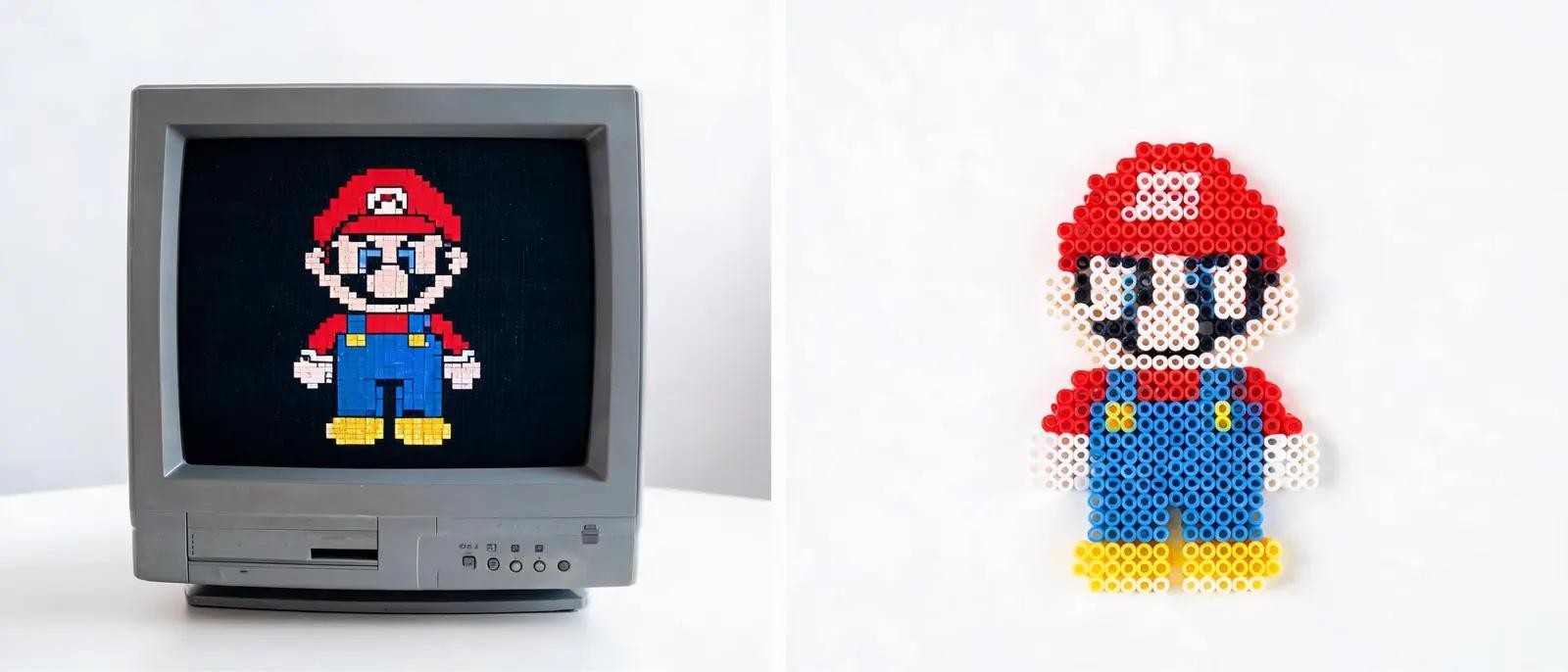
Pixel art and fuse beads share a fundamental characteristic: both are created by placing small, colored units on a grid to form a larger image. In pixel art, these units are pixels on a screen; in fuse beads, they are plastic beads on a pegboard. This one-to-one correspondence makes fuse beads the physical equivalent of digital pixel art. Whether you're a retro gaming enthusiast or a digital artist, translating your pixel designs into bead art is a natural and rewarding process. The beauty of this partnership lies in its accessibility. You don't need advanced software or artistic skills to start. If you can count squares on a grid, you can create fuse bead pixel art. Many crafters begin by recreating their favorite video game sprites, like Mario or a Pokémon, because the pixel art already exists in a format that's easy to map bead-by-bead. For beginners looking to dive in, our guide to fuse beads for beginners offers a gentle introduction to materials and techniques. Moreover, the connection goes both ways. Just as pixel art can be converted into fuse bead patterns, creating fuse bead art can improve your understanding of pixel art principles like color limitation, shading, and composition. This synergy makes the hobby both fun and educational, appealing to crafters of all ages.

From Screen to Bead: Converting Sprites into Patterns

Converting a digital sprite into a fuse bead pattern is a straightforward process that can be done manually or with software. The first step is to obtain a clear pixel art image. Classic video game sprites are ideal because they are already in a low-resolution, pixel-perfect format. You can find sprites online or create your own using free pixel art editors. Once you have your image, you'll need to map each pixel to a specific bead color. If you're working manually, print your sprite on a grid or use graph paper. Count the pixels to determine the size of your project. For example, a 16x16 sprite will require a 16x16 pegboard, which is a standard size. Then, match each pixel's color to the closest bead color available from your supplier. This is where a good fuse bead color guide becomes invaluable, as it helps you understand color codes and find substitutes. For complex sprites with many colors, consider simplifying the palette to 10-15 colors to keep the project manageable. Alternatively, you can use online tools that automatically convert images into fuse bead patterns. These tools often allow you to upload an image, adjust the size, and select your bead brand (e.g., Perler, Hama, Artkal). They then generate a grid with color codes. However, manual conversion gives you more control over color choices and can be a meditative activity. Many crafters enjoy the process of translating each pixel by hand, as it deepens their connection to the artwork.
From Screen to Bead: Converting Sprites into Patterns

Color Mapping: Matching Pixels to Beads

Color mapping is the heart of converting pixel art to fuse beads. It involves selecting the right bead colors to represent each pixel. The challenge is that digital colors are infinite, while bead colors are limited. A good strategy is to start with a base palette of 20-30 colors that cover the spectrum, including various shades of each hue. Then, for each pixel, find the closest match. This is similar to how old video game consoles had limited color palettes, which is why pixel art often looks cohesive. When mapping colors, consider the lighting and shading in your sprite. Highlights and shadows can be represented by lighter and darker shades of the same color. For example, a red shirt might use bright red for the main area, dark red for shadows, and pink for highlights. If your bead collection lacks a specific shade, you can mix beads or use a slightly different hue. Our fuse bead color guide provides detailed information on color families and substitution tips. Another important aspect is transparency. Some sprites have transparent backgrounds, which in fuse beads can be left empty or filled with a background color. If you want to create a hanging ornament, you might leave the background empty to create a silhouette effect. For more ideas on ornaments, check our fuse bead Christmas ornaments guide. Remember, the goal is to capture the essence of the sprite, not to replicate it exactly. Sometimes a slight color deviation can make your bead art unique.

Tools and Materials for Pixel Bead Art

To start your pixel bead art journey, you'll need a few essential supplies. First, choose a pegboard. Standard square pegboards come in sizes like 14x14, 29x29, and larger. For pixel art, square boards are ideal as they mimic the pixel grid. You can also connect multiple boards for larger projects. Our guide to best fuse bead pegboards reviews top options. Next, select your beads. Perler, Hama, and Artkal are popular brands, each with its own color range and bead size. Most are 5mm and compatible with each other, but it's best to stick to one brand for consistency. For a comparison, see our Perler vs Hama vs Artkal guide. You'll also need tweezers for placing beads precisely, especially for small details. A bead scoop or sorting tray helps manage colors. Ironing paper and an iron are necessary to fuse the beads. For a detailed tutorial on ironing, check our how to iron fuse beads guide. Finally, consider storage solutions like compartment boxes to keep your beads organized by color. Our guide to storing fuse beads offers practical tips. When working on pixel art, it's helpful to have a printed pattern or a digital reference on a tablet. You can use our pattern generator to create custom patterns from your images. This tool simplifies the conversion process and lets you experiment with different bead brands and sizes. With these tools, you'll be well-equipped to bring your pixel art to life in beads.
Tools and Materials for Pixel Bead Art

Step-by-Step: Creating Your First Pixel Bead Project

Ready to make your first pixel bead art? Follow these steps. First, choose a simple sprite, like an 8-bit heart or a small character. Print or display the pattern. Set up your workspace with a pegboard, beads, tweezers, and a small container for each color. Start by placing the outline or the darkest colors first; this provides a framework. Then fill in the main colors, working section by section. Use tweezers for precision. If you make a mistake, simply remove the bead with tweezers. Once the design is complete, cover it with ironing paper and iron on medium heat. Move the iron in circular motions for about 10-20 seconds until the beads fuse. Let it cool, then peel off the paper. If you want a more fused look, iron the other side briefly. For a detailed ironing guide, see our how to iron fuse beads tutorial. After cooling, your pixel art is ready to display. You can turn it into a magnet, keychain, or coaster. For keychain instructions, check our how to make Perler bead keychains guide. As you gain confidence, try more complex sprites or create your own designs. Experiment with different bead finishes, like glitter or glow-in-the-dark, to add flair. Remember, practice makes perfect. Each project improves your color mapping and bead placement skills.

Beyond Sprites: Expanding Your Pixel Bead Art

Once you've mastered converting sprites, you can explore other pixel art applications. Create original pixel art using software like Aseprite or free online editors, then convert it to beads. You can also make pixel art from photos by reducing the color palette and resolution. This is a great way to create personalized gifts. For inspiration, browse our cool fuse bead ideas and animal fuse bead ideas. Consider making functional items like coasters, wall art, or even 3D structures. Our 3D fuse bead tutorial shows how to build 3D objects from flat pixel pieces. You can also create jewelry, such as earrings, by using small pixel patterns. Check our fuse bead earrings and jewelry guide for ideas. The possibilities are endless, limited only by your imagination. Finally, share your creations with the community. Join online forums or social media groups where crafters exchange patterns and tips. The pixel art and fuse bead community is welcoming and full of inspiration. Whether you're making a simple sprite or a complex scene, you're part of a tradition that bridges digital and physical art.

よくある質問

What is the best way to convert pixel art to fuse beads?

The best way depends on your preference. For simple sprites, manual conversion using graph paper works well. For complex images, use online tools or our pattern generator to automatically map colors. Always start with a clear pixel art image and simplify the color palette to match available bead colors.

How many bead colors do I need for pixel art?

You can start with a basic set of 20-30 colors that cover the spectrum, including light, medium, and dark shades of each hue. As you progress, expand your collection with specialty colors like pastels, neon, or metallic. Many crafters find that a well-rounded palette of 50-100 colors handles most projects.

Can I use any pixel art image for fuse beads?

Yes, but consider the size and complexity. Very large or highly detailed images may require many beads and a large pegboard. It's best to start with smaller sprites (under 50x50 pixels) and gradually work up. Also, ensure you have the right bead colors or suitable substitutes.

How do I make my pixel bead art look more detailed?

To add detail, use smaller beads (like 2.6mm mini beads) for finer resolution. Also, incorporate shading and highlights by using multiple shades of the same color. You can also add outlines with black or dark beads to define shapes. Experiment with different bead finishes to add texture.

オリジナルパターンを作成する準備はできましたか?

無料の図案メーカーを開く
シェア: