Menu

FuseBeads Hub © 2026

Minecraft Fuse Bead Patterns: Blocks, Mobs & Pixel Guides

Craft Minecraft fuse bead patterns for Creepers, Endermen, blocks, and tools. Includes pixel guides, material lists, and step-by-step tips for pixel art.

Débutant5 min read de lecture

Why Minecraft Is Perfect for Fuse Beads

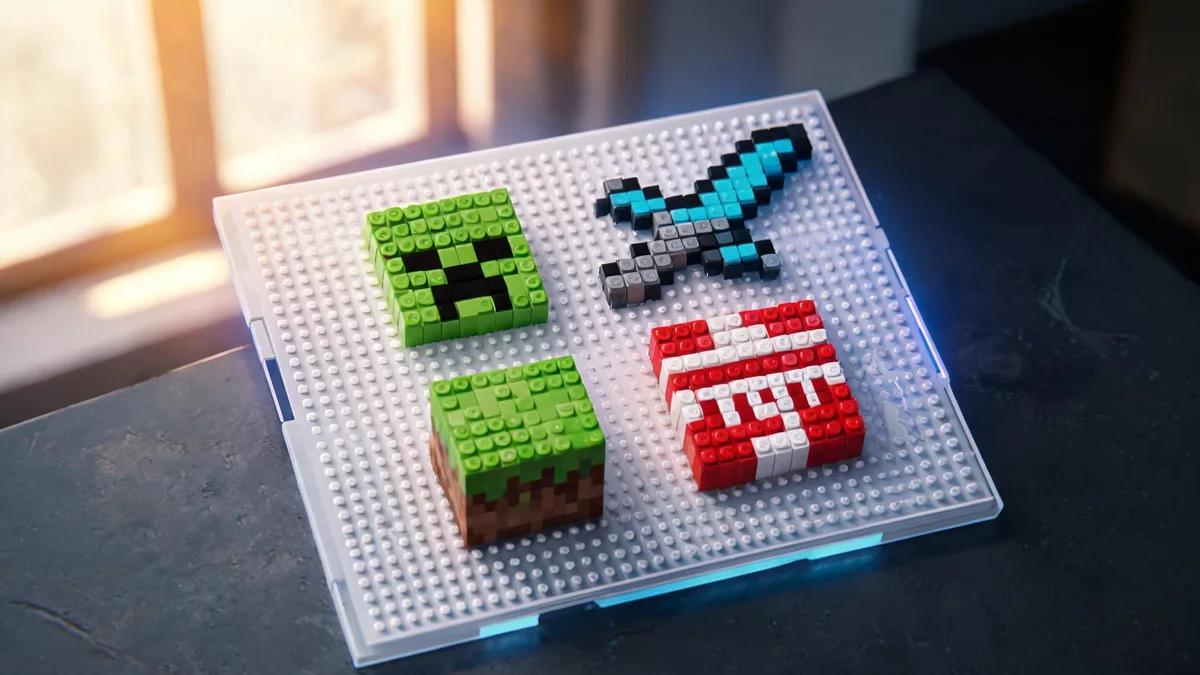
Minecraft is a game built on pixels. Every block, mob, and tool is rendered in a grid of squares, which makes it a natural match for fuse beads. Each bead becomes one pixel, so you can recreate your favorite characters and items with surprising accuracy. Whether you are a seasoned crafter or just starting out, Minecraft fuse bead patterns offer a fun, recognizable, and endlessly expandable project. The charm of Minecraft fuse bead patterns lies in their simplicity and flexibility. You can start with a single Creeper face on a small square pegboard, or go big with a full biome scene spanning multiple boards. The pixel grid translates directly to your pegboard, so you do not need to be an artist—just follow the pattern square by square. This makes it an excellent activity for kids and adults alike, and a great way to introduce beginners to the hobby. If you are new to fuse beads, our beginner's guide covers all the basics. Beyond the fun factor, these patterns are incredibly versatile. Finished pieces can become keychains, magnets, coasters, or wall art. You can also combine multiple small patterns into a larger mosaic. The Minecraft community constantly shares new pixel grids, so there is always inspiration to find. And because the game's art style is so iconic, even a simple 10x10 design is instantly recognizable.

Essential Materials and Tools for Minecraft Bead Art

Before you dive into your first Creeper, gather the right supplies. The core materials are fuse beads (also called Perler or Hama beads), pegboards, ironing paper, and an iron. For Minecraft patterns, you will need a good range of colors: greens for Creepers, blacks and purples for Endermen, browns and grays for blocks, and various accent colors for details. A standard 29-color mix is a solid starting point, but you may want to buy specific colors in bulk for larger projects. Our fuse bead color guide can help you match Minecraft's palette. Pegboards come in several shapes and sizes. The classic square board (29x29 pegs) is ideal for most Minecraft blocks and mobs. For larger builds, you can connect multiple boards using interlocking tabs. If you plan to make many patterns, consider a multi-board set or a large clear board that lets you see the pattern underneath. For more details on choosing boards, see our best fuse bead pegboards guide. You will also need tweezers for placing beads precisely, especially in tight spots. A bead scoop or sorting tray helps keep colors organized. When it comes to ironing, a reliable iron with adjustable temperature is key. Always use ironing paper to protect your project and your iron. For a complete rundown of tools, check our recommended fuse bead tools. Finally, consider storage: small containers or a bead organizer will save you time and frustration. Our storage guide offers practical solutions.
Essential Materials and Tools for Minecraft Bead Art

How to Make a Creeper (and Other Iconic Mobs)

The Creeper is the most iconic Minecraft mob and a perfect first project. Its face is a simple 8x8 pixel grid: two black squares for eyes, a black mouth shape, and a green background. To make it, start by placing green beads to form the outer square. Then add the black eye pixels at the top corners, leaving a two-pixel gap between them. The mouth is a black rectangle in the lower center with two downward extensions. Once the pattern is complete, cover it with ironing paper and iron on medium heat in circular motions until the beads fuse. Let it cool, then flip and iron the other side for extra strength. For a step-by-step visual, see our how to iron fuse beads guide. Endermen are another favorite. They are tall, black, and have distinctive purple eyes. A full-body Enderman pattern is about 10x20 pixels, but you can also make just the head. Use black beads for the body and head, and two purple beads for the eyes. Because black beads can blend together, make sure your pegboard is a contrasting color (like white or clear) so you can see the gaps. For more mob ideas, including Zombies, Skeletons, and Slimes, browse our cool ideas collection. Other mobs like the Zombie, Skeleton, and Spider are also great. The Zombie has a green face with dark eyes and a blue shirt. The Skeleton is mostly white and gray with a bow. The Spider is black with red eyes. Each mob has a distinct silhouette, so even small patterns are recognizable. If you want to make a set, consider mounting them on a display board or turning them into magnets. Our fuse bead magnets set guide shows you how.

Building Blocks, Tools, and Biomes in Beads

Minecraft blocks are the building blocks of the game, and they translate beautifully into fuse beads. Start with the classic grass block: a 16x16 pattern with brown dirt at the bottom and green grass on top. Other easy blocks include stone, cobblestone, wood planks, and diamond ore. Each block is a square grid, so you can make a single block as a coaster or combine multiple blocks into a larger scene. For coaster ideas, see our Perler bead coasters guide. Tools are another fun category. A diamond pickaxe, sword, or axe is a simple shape with a wooden handle and a colored head. The diamond tools use cyan beads, while iron tools use light gray. You can make a full set of tools and display them on a wall. Our wall art guide has tips for mounting and framing. Tools also make great keychains—check our keychain tutorial for instructions. Biomes offer a chance to get creative. You can recreate a small landscape with a few blocks: a grass field, a tree, a small pond, and maybe a Creeper hiding in the bushes. Use a large pegboard or connect several to create a panoramic scene. Popular biomes include the Forest, Desert, and Nether. For a 3D twist, try building a floating island or a cube-shaped biome. Our 3D fuse bead tutorial explains how to assemble multi-layer projects. You can also turn biome scenes into ornaments or photo frames—see our ornaments guide and photo frame guide for inspiration.
Building Blocks, Tools, and Biomes in Beads

Tips for Perfect Minecraft Fuse Bead Patterns

To get crisp, recognizable results, precision is key. Always count your pixels carefully and double-check the pattern before ironing. A common mistake is to place a bead one peg off, which can distort the entire design. Using a printed pattern underneath a clear pegboard helps you stay accurate. If you are designing your own pattern, start with a grid paper or a digital tool. Our pattern generator can convert images into bead patterns, and you can adjust the size and color count. Color choice matters. Minecraft uses a limited palette, so try to match the game's colors as closely as possible. For example, Creeper green is a specific shade—too bright or too dark and it won't look right. Buy a few extra beads of each key color to avoid running out mid-project. Also, consider using a mix of matte and glossy beads for texture, but keep it consistent within a single piece. Ironing technique is crucial. Iron evenly with medium heat, using circular motions and light pressure. Over-ironing causes beads to close up and lose the pixel look; under-ironing leaves them fragile. Aim for a fused but still bumpy texture. Always iron on a heat-resistant surface and let the piece cool completely before removing it. For more detailed ironing tips, see our how to iron guide. Finally, if you are making items for kids, ensure safety by following our fuse beads safe for kids guide.

Questions fréquentes

What size pegboard do I need for Minecraft patterns?

Most Minecraft blocks and mobs fit on a standard 29x29 square pegboard. For larger scenes or multiple characters, you can connect several boards using interlocking tabs. A clear pegboard is helpful because you can place a printed pattern underneath. If you are making a full biome, consider a large board or a multi-board set.

How many beads does a Creeper pattern need?

A classic Creeper face is 8x8 pixels, so it uses 64 beads. You will need mostly green beads, plus a few black beads for the eyes and mouth. If you make a full-body Creeper, it can be around 10x20 pixels, requiring about 200 beads. Always buy extra to account for mistakes or color variations.

Can I use any brand of fuse beads for Minecraft patterns?

Yes, but colors and bead sizes can vary between brands. Perler, Hama, and Artkal are popular and compatible in size, but their color palettes differ. For consistent results, stick to one brand per project. Our guide on Perler vs Hama vs Artkal compares them in detail. If you mix brands, test a small piece first to ensure they fuse evenly.

How do I make my Minecraft fuse bead art more durable?

To increase durability, iron both sides of the piece. The first ironing fuses the beads; after cooling, flip it over and iron the back side lightly. This adds strength and prevents breakage. For items that will be handled often, like keychains, consider adding a layer of clear glue or Mod Podge on the back. Also, store finished pieces flat to avoid bending.

Prêt à créer vos propres modèles ?

Ouvrir le créateur gratuit
Partager :